Exporting your GP-33 library
What it is
Export Library saves your whole GP-33 library as one file: every song, and every playlist and folder you've made. What you build in GP-33 is yours, and you can take it with you.
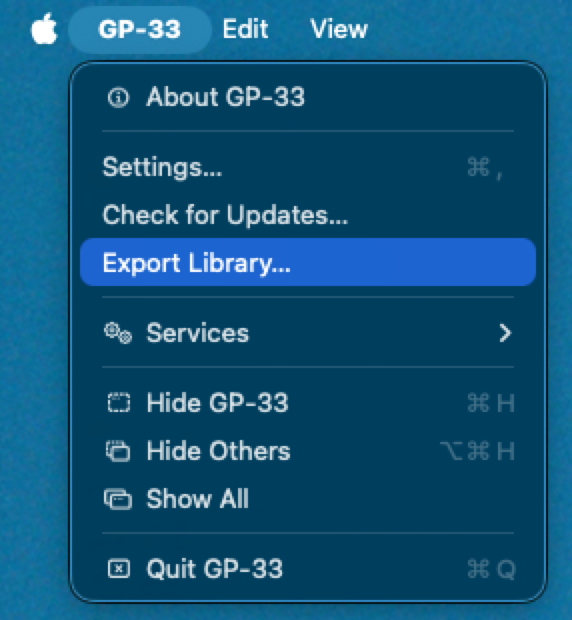
Export it
In the GP-33 menu, choose Export Library… and pick where to save the file. It's called gp33-library.xml.
What's in the file
- Every song: its name, artist and album, when you added it, and where its file is on your Mac.
- Its BPM, key and format, and whether it was made with Groovemark.
- Your playlists and folders, in the same places and the same order.
The file is in the same format Apple Music exports, so other music apps can read it.
It's the list, not the music
The file says where each song is. It doesn't hold the songs themselves. To move your music, copy your library folder too. GP-33's library location says where that is.
Bringing it into another GP-33
In the other GP-33, open Settings → files, press Import, and choose the file. Your songs and playlists come over the same way an Apple Music library does: GP-33 brings in the songs it can find where the file says they are. See Importing from Apple Music.
What we never do
Exporting only reads your library. Nothing in it is changed, and the file stays on your Mac.
Still need help? hit us up.