Installing Groovemark and GP-33
What you get
One download holds both apps: Groovemark, which turns a recording of a whole album into named, tagged tracks, and GP-33, the free player built for what you digitize. You can play Groovemark made tracks in any audio player, but they interface best with GP-33. The download also holds a short Read Me. Install one or both; each works on its own, but they work best together.
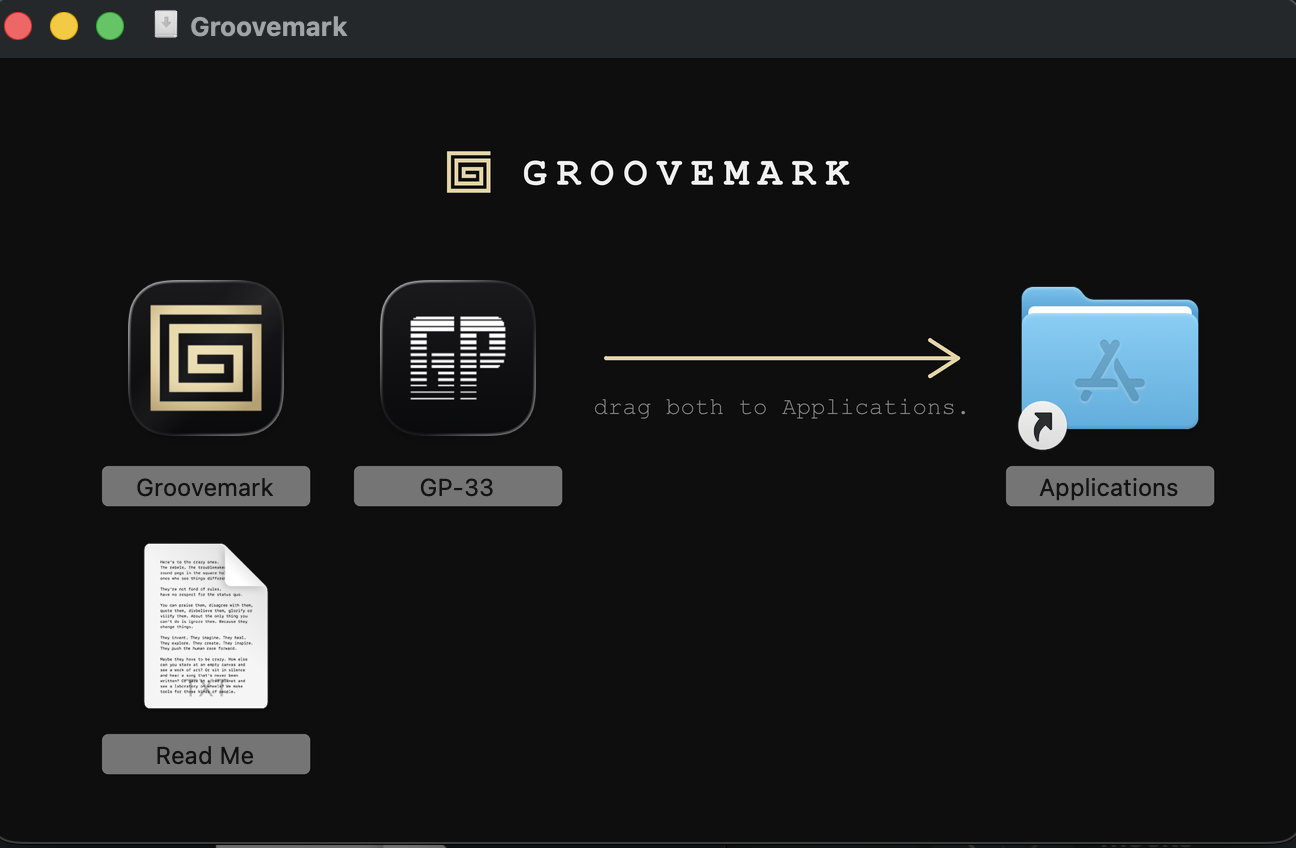
Installing
- Download the disk image from groovemark.app.
- Open it. A window shows both apps and your Applications folder.
- Drag Groovemark and GP-33 into your Applications folder.
- Eject the disk image, then open Groovemark from your Applications folder.
Note: Open the apps from Applications, not from the disk image. An app opened from the disk image can't save its updates.
The first time you open it
Both apps are signed and checked by Apple. The first time you open each one, your Mac asks whether you're sure you want to open an app downloaded from the internet. Choose Open. It only asks once.
Groovemark then opens to the free trial: your email, a short code, and two free exports. See How the free trial works.
Groovemark and GP-33 together
In Groovemark, open Settings and press Connect beside GP-33. From then on, Save album files each album straight into GP-33's library, tagged and ready to play.
Updates
Groovemark checks for updates on its own about once a day, and you can ask any time from the Groovemark menu: Check for Updates…. Nothing installs until you choose Install Update. A new version of GP-33 comes as a new download.
What it needs
A Mac with macOS 10.15 or later, Apple Silicon or Intel, and an internet connection to look up albums. See Groovemark Minimum Requirements.
Still need help? hit us up.